
Just switched from PC to Mac, new to everything especially how macOS works. I’m wondering if there is any apps to use for cleaning registry and keeping Mac fast?
Welcome to the Mac world. Unlike the Windows operating system, macOS does NOT have or use a registry. Therefore, there is no such registry cleaner app for Mac. If you find one that claims it does, beware that the app is probably a scam.

As for the best app to keep your Mac clean and fast, you can use some Mac cleaner apps that can help detect unnecessary files and system junk, and by removing them, you can free up a lot of disk space and increase the overall performance.
Contents
Windows Registries vs Mac Preference Files
On a PC, the Registry is a database that saves relevant settings and preferences for the Windows operating system and third-party programs you install. Microsoft strongly recommends its users back up the registry before making any changes to them.
Over time, after a number of software installation and uninstallation processes, the registry may become broken or outdated. The typical symptom is that you see some error messages popping up when you try to access specific programs.
macOS is based on Unix, which doesn’t have or need a registry. Instead, all the rules or parameters of third-party apps you’ve installed are stored in Mac’s Preference Files (in .plist format). You can easily find these preferences files within your apps’ contents.
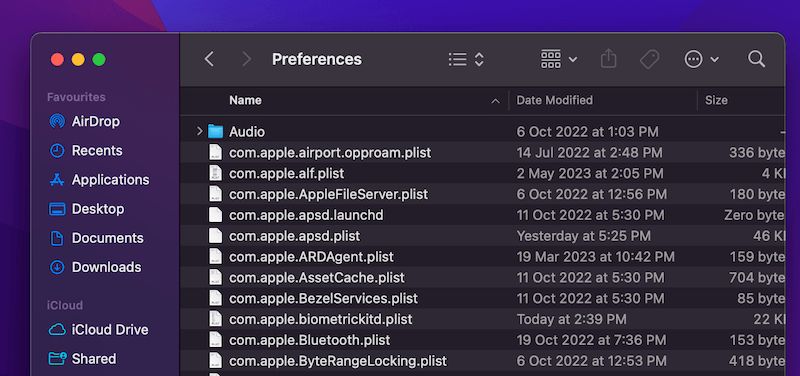
The similarity macOS Preference Files shares with Windows Registries is that those preferences can also become corrupted due to events such as application crashes, hard drive corruption, etc.
What to Do if System Preference Files Are Corrupted on Mac?
Just delete them!
Deleting preference files is the best solution to fix the problem and the action is totally harmless. Because macOS itself will automatically create new preference files for the apps and make them operate correctly again.
So how to delete a problematic preference file?
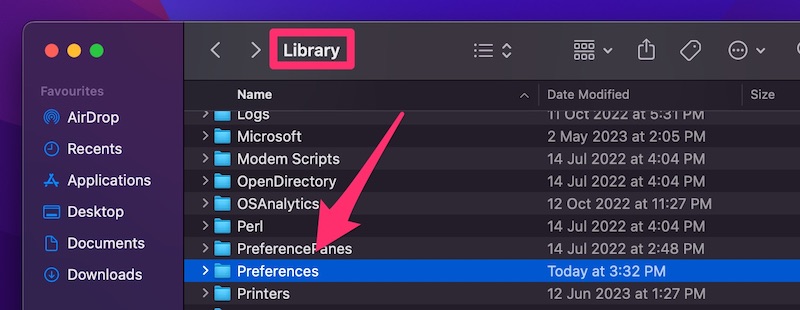
The manual method is to find the file first, then drag it to the trash and empty trash. On your desktop, click Go > Computer > Macintosh HD > (your username) > Library > Preferences, locate the .plist file and delete it.
Conclusion
There are no such registry cleaners for Mac, as macOS doesn’t have registries as Windows does. macOS manages system preference files associated with third-party apps, the preferences might become corrupted. But you can often fix the problem by simply deleting them.

Dana Rodgers
What about MacKeeper? Are they a good cleaner? They keep bugging us.
AnySoftwareTools
We don’t recommend it.